
THE MUVO GUIDE
6 AI music generation tools compared for 2026
The right AI music generator depends on what you want to finish: a song, a new mix, a soundtrack, or a music video. Here is how six tools available online compare, and where MUVO gives personal creators a more connected workflow on iPhone and iPad.
Publisher disclosure: MUVO makes one of the apps in this guide. We compared documented workflows, export options, and usage terms using the official sources linked below. Recommendations are our assessment of fit, not a listening test or a claim of superior audio quality. Plans and features can change; check the linked provider pages before paying.
Which AI music generation tool should you choose?
Choose MUVO for personal songs, remixes, and portrait music videos in one iPhone or iPad app. Consider Suno for song generation and production tools, Udio for experimenting with song variations, SOUNDRAW for editable beats and background tracks, AIVA for composition with MIDI, and Beatoven.ai for soundtracks to accompany videos or podcasts. Compare download access and usage rights as carefully as the music features.
AI music tools at a glance
An AI music generator creates musical material from instructions such as a text description, lyrics, style choices, or permitted reference audio. Some tools focus on the finished recording; others help you compose or produce music for another project. These are use-case recommendations, not an overall ranking.
| Tool | Consider it for | Know before you start |
|---|---|---|
| MUVO | Personal songs, remixes, and portrait music videos on iPhone and iPad | Free editable drafts; audio and other paid creation use credits. Generated outputs are for noncommercial use. |
| Suno | Songs with vocals, editing, and a production workspace | Free and paid plans; download allowances and commercial permissions depend on the plan and terms. |
| Udio | Prompt-based songs, extensions, and variations | Its current help notice says audio, video, and stem downloads are disabled. |
| SOUNDRAW | Beats and background music with arrangement controls | Creator and Artist plans cover different uses; distribution has modification requirements. |
| AIVA | Composition, MIDI workflows, and editable tracks | Free use is noncommercial with attribution; paid plans have different monetization permissions. |
| Beatoven.ai | Background music for videos, podcasts, and other content | Content-use licensing does not allow direct distribution of its music to streaming services. |
On small screens, scroll the table sideways. Official sources and the MUVO comparison for each tool follow below.
1. MUVO: from a personal idea to a song, remix, and video
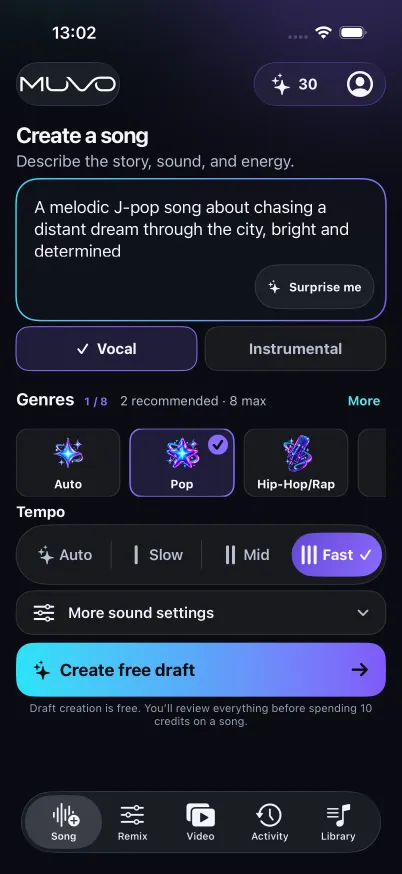
MUVO brings AI song generation,vocal separation and remixing, andportrait-led music videos into one native app for iPhone and iPad. Start with a story or mood, shape the draft, generate a vocal song or instrumental, and keep the result in Library.
What MUVO does better for this workflow
- Keeps the next creative step in the same app. A finished Library song can become the starting point for a remix or an eligible music video. You can develop the music and its visual story without assembling that workflow across separate audio and video tools.
- Gives the idea a review stage before paid audio generation.Create a free draft, edit its title, lyrics, and sound direction, then review the credit quote. A draft is a written plan, not a free audio preview.
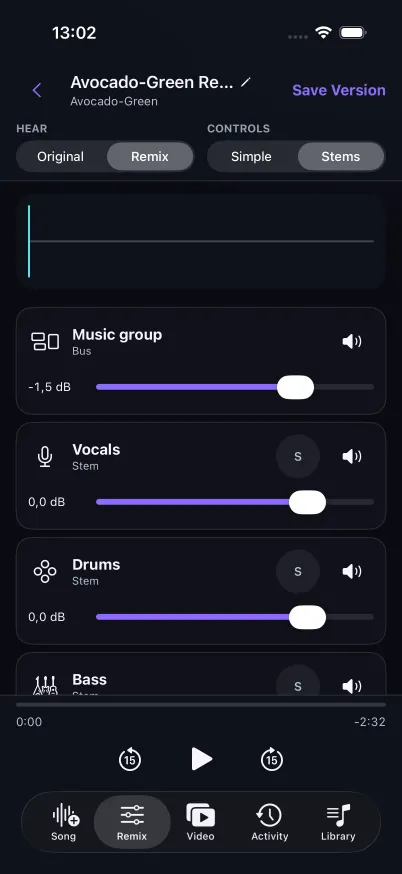
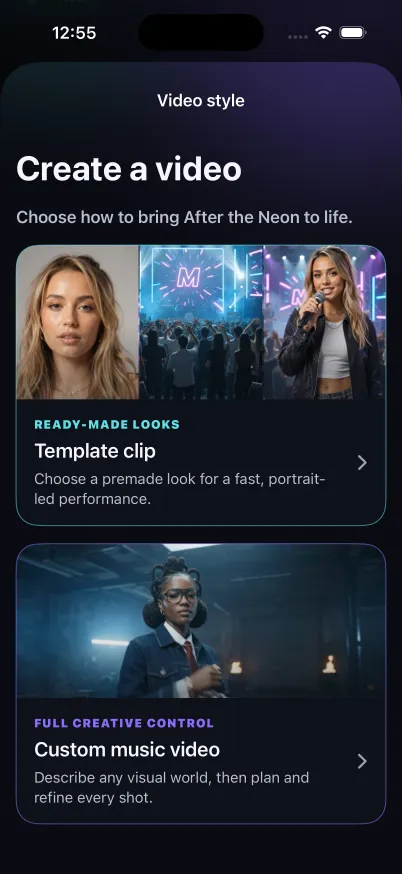
- Connects hands-on remixing with personal video creation.Separate permitted audio, adjust levels and pan, or add generated instrument parts. For an eligible song, use your own adult self-portrait in a Template clip or develop a Custom music video's look and storyboard.
- Lets occasional creators buy credits without a recurring plan.One-time credit packs and an optional Creator subscription support different creation habits. Paid actions show their quote before you confirm.
- Keeps finished work useful beyond the generation screen.Download finished songs in the app for offline listening, export M4A or WAV audio, and export completed videos for personal sharing.
Where MUVO is not the right fit: MUVO is for adults aged 18 or older who have reached local legal majority. It requires iOS or iPadOS 18 or later; the app interface is in English. Creation requires an internet connection. Generated outputs are for personal, noncommercial sharing, including on paid plans. If you need monetized releases, advertising, or client work, choose a service whose license covers that use. See MUVO's output-use terms.
2. Suno: songs and production tools
Suno is a relevant choice for turning an idea into a song and continuing into editing. Its paid plans include stem separation, and Premier includes Suno Studio with MIDI, effects, and automation. Suno offers a free tier; its current paid tiers have monthly song-download allowances.Source: Suno features and plans.
Where MUVO is a better fit: choose MUVO when you want a guided personal song-to-portrait-video workflow, or want to buy a credit pack without keeping a subscription. Suno's pricing page says purchased top-up credits require an active subscription to use. MUVO's free draft also gives you a clear checkpoint to review the idea before paying for audio.
Where Suno has the edge: its documented Studio production features suit creators who want to work with MIDI and effects. Suno also offers commercial-use permissions for qualifying paid downloads, subject to its terms and restrictions; MUVO does not offer commercial output rights. Read Suno's paid-use guidanceand Terms of Service, particularly the rules for remixes. See its download policyfor current allowances and Studio exceptions.
3. Udio: song variations and extensions
Udio lets you generate songs from descriptions and develop them through extensions and remixes. Its paid Sessions view supports replacing sections and comparing takes. These are useful options when you enjoy exploring alternative versions of a musical idea. Sources: song creation,extensions, andSessions.
Where MUVO is a better fit: file export and remixing on your Apple device. At this guide's review date, Udio'sofficial service-change noticesays audio, video, and stem downloads are disabled. MUVO supports M4A and WAV audio export and finished-video export for personal use.
Udio has an iPhone app, but itscurrent iOS guidesays it is not optimized for iPad and lists audio uploading and remixing among its app limitations. MUVO supports iPhone and iPad with permitted audio import and remix controls. Udio's browser workflow remains worth considering for section-by-section experimentation; verify its latest export status before committing to a project that needs downloadable files.
4. SOUNDRAW: editable beats and background music
SOUNDRAW focuses on generating music from choices such as genre and mood, then adjusting the arrangement, energy, and instruments. Selected Artist plans offer WAV and stem downloads for further production.Source: SOUNDRAW product and plans.
Where MUVO is a better fit: choose MUVO when the goal is to turn your own story into a vocal song and a portrait-led video. MUVO connects editable lyrics, song creation, remixing, and video planning around your Library, giving personal creators a broader path to a finished audio-and-visual project in one mobile app.
Where SOUNDRAW has the edge: a creator needing background music for commercial content can investigate its Creator license; an artist planning a release can investigate its Artist license. SOUNDRAW requires qualifying modifications before distributing its beats as songs and prohibits Content ID registration. Read theSOUNDRAW license for the applicable plan and project. MUVO's output permissions are personal and noncommercial.
5. AIVA: composition and MIDI workflows
AIVA offers generated compositions, track editing, and audio or MIDI influences. Its free plan includes MP3 and MIDI downloads for noncommercial use with attribution. Standard and Pro have different monetization and download terms, with WAV export listed for Pro.Source: AIVA features and pricing.
Where MUVO is a better fit: a personal creator can move from a written idea to sung lyrics, a new mix, and a portrait music video through connected app workflows. You can focus on the story you want to hear and share, with an editable draft before paid generation.
Where AIVA has the edge: its documented MIDI workflow is relevant when you want to develop a composition in music software. MUVO's published audio export options are M4A and WAV. Choose based on whether you need a recording to listen to or compositional material to continue arranging.
6. Beatoven.ai: soundtracks for other content
Beatoven.ai generates background music from descriptions and offers MP3 and WAV downloads. Its official site describes a nonexclusive license for using downloaded music in video and audio content, including monetized content. It also says direct distribution to music streaming services such as Spotify and Apple Music is not allowed.Source: Beatoven.ai product and licensing FAQ.
Where MUVO is a better fit: choose MUVO when you want the song itself to tell your story, then build a personal video around it. Vocal lyrics, remix controls, and portrait-led video creation belong to that same creative journey. That suits a personal song or music-video project more directly than shopping for a background soundtrack.
Where Beatoven.ai has the edge: consider it when you already have a podcast or video project and need music licensed to accompany it, including eligible commercial content. Check its current license against your intended use; MUVO does not grant that commercial permission.
How to create your first AI song with MUVO
Start with a specific feeling and a few musical choices. For example:
A warm indie-pop song about two friends reconnecting after years apart. English vocals, gentle guitar, a steady mid-tempo beat, and a hopeful chorus. Keep the verses intimate and let the final chorus feel brighter.
- Describe your idea. Choose vocals or instrumental, then set the genre, mood, tempo, and other sound preferences.
- Create and edit the free draft. Review the title, lyrics for vocal songs, and sound direction. Save your changes.
- Review the quote and confirm audio generation.The finished song arrives in Library. Listen before deciding whether you want to remix it or use it in an eligible music video.
- Develop and share the result. Export audio, or use your own adult self-portrait for a Template clip or Custom music video. Video stages have separate credit quotes. Share within the personal-use terms.
This prompt is a starting idea, not a promised result. Use lyrics, recordings, and images you have permission to process. For a more detailed walkthrough, see how to turn a prompt into a song.
Frequently asked questions about AI music generation
What is the best AI music generator?
There is no single best tool for every project. MUVO fits personal songs, remixes, and portrait videos on iPhone and iPad. Suno offers song and production workflows; Udio offers song experimentation; AIVA supports composition with MIDI. SOUNDRAW and Beatoven.ai are options to investigate for background music. Match the output, editing controls, downloads, and license to the project you want to finish.
Can I generate AI music for free?
Some tools, including Suno, Udio, and AIVA, list free tiers with limits. Udio's credit guideexplains its free-account allowances. Free generation, free downloads, and commercial-use permission are separate questions. In MUVO, downloading the app and creating editable drafts are free; generating the audio uses credits. Read each tool's linked plan details above before comparing costs.
Can I use AI-generated music commercially?
Permission depends on the service, plan, track, and intended use. Some providers offer commercial licenses with conditions. MUVO-generated outputs are for personal, noncommercial use on every plan; buying credits or subscribing does not add monetization, advertising, resale, or client-use rights. Review MUVO's terms and the relevant provider's current license before publishing.
How is MUVO different from Suno and Udio?
MUVO's focus is a connected personal workflow: draft, generate, remix, create a portrait music video, and keep the results in Library. One-time credit packs make a recurring subscription optional. Suno and Udio also offer song creation and editing; the comparisons above explain their strengths and the current differences in production tools, mobile features, and exports.
Can an AI music app also create a music video?
MUVO can create a portrait-led video from an eligible finished song. Template clips use a ready-made setting; Custom music videos let you develop a look and storyboard before rendering. Both require your own adult self-portrait and the in-app consent checks. See themusic-video workflow for eligibility and credit details.