Write an original English dance-pop song titled Electric Morning about stepping into the city after a hard night and choosing a fresh start.
We make our own electric morning
We make our own electric morning
We don't need the sun to rise
We got the fire in our eyes
We make our own electric morning
CINEMATIC ALT-POP · MALE VOCAL · 28 SEC
Satellites in the Rain
Listen to the chorus
The prompt & lyrics
Song prompt excerpt
Write an original English cinematic alt-pop song titled Satellites in the Rain about finding connection across a sleeping city.
We are satellites in the rain
Shining bright through the mist and pain
Spinning close in the quiet space
Finding home in a cold embrace
Yeah, we are satellites in the rain
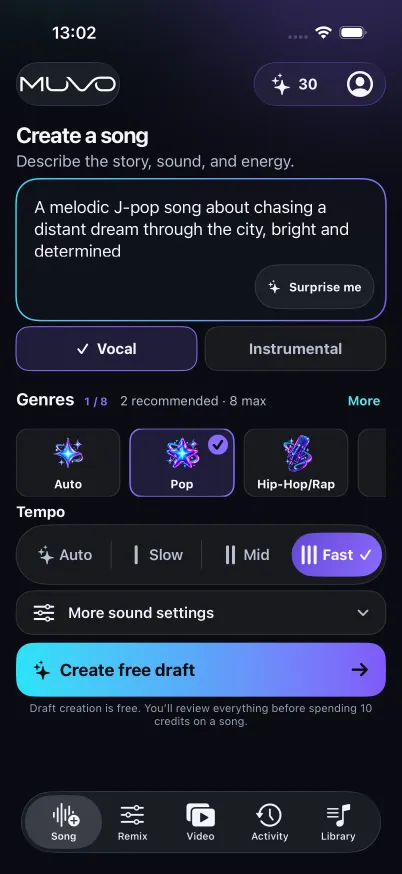
Write about the story, sound, and energy. Choose vocals or instrumental, then explore genres, mood, tempo, and sound settings.
02
Make the draft yours
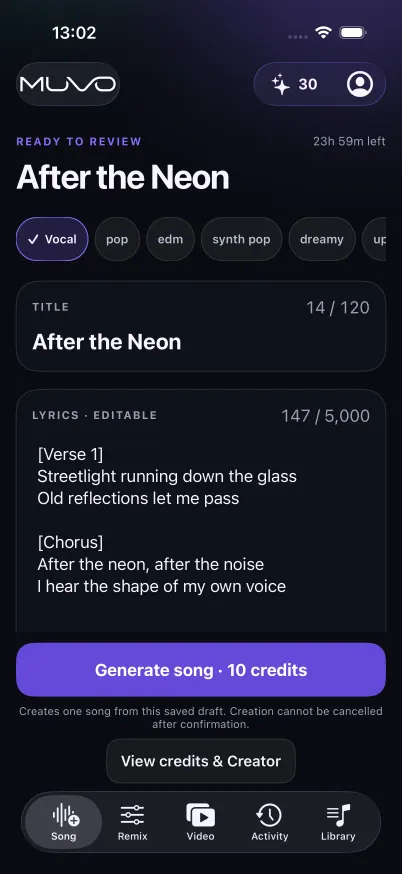
Create a free draft. Review and edit its title, lyrics for vocal songs, and sound direction before saving your changes.
03
Bring it to life
Review the credit cost and confirm generation. Your finished song arrives in Library, ready to play and export.
TRY AN IDEA OF YOUR OWN
How to turn a prompt into an AI song
A useful song prompt describes the subject, the mood, and the sound. Start with one clear idea, then use the editable draft to make the lyrics and production direction more specific.
An upbeat indie-pop song about a late-night drive home with friends. Warm guitar, a steady danceable beat, and a hopeful chorus about remembering the small moments. English vocals.
Choose Vocal for sung lyrics, or Instrumental for music without singing. Use the genre, mood, and tempo controls to reinforce your prompt.
Create the free draft. For a vocal song, read the verses and chorus; replace vague lines with details from your own story. Review the title and sound direction, then save your edits.
Review the audio-generation credit quote before confirming. Listen to the finished song in Library, then export M4A or WAV when you want to share it.
YOU HAVE A SAY IN THE SOUND
Read it. Shape it. Then press create.
A draft gives the idea a shape before it becomes audio. Refine the title, lyrics, and production direction, then save the version you want to hear.
Generation is a separate, confirmed step. You see the credit cost before you commit.
A little direction. A lot of possibility.
Combine genres or let Auto find a direction. Set the mood and tempo, and choose a language and vocal preference for vocal songs.
Your words get a second draft.
You can read and change the lyrics before generating the song. Instrumental drafts focus on the sound, with no sung lyrics.
Keep listening. Keep creating.
Follow along with karaoke where available, download songs for offline listening, or export M4A and WAV files. Open an eligible song in Remix or Video to take it further.
A FEW THINGS TO KNOW
Good questions.
A little clarity before your next idea.
Is creating a draft free?+
Yes. Draft creation is free. Generating the audio is a separate action that uses credits, with the cost shown before you confirm.
Can I make an instrumental?+
Yes. Choose Instrumental when you start. MUVO creates a sound-focused draft without lyrics or vocal settings.
Can I listen offline?+
You can download finished songs in the app for offline listening. Drafting, generation, and exporting require a connection. Persistent offline video downloads are not available.
PLAY MORE. FEEL MORE.
See where your next idea takes you.
Make a song. Find a new version. Bring it to life.
With your permission, we use Google Analytics to understand visits and interactions. Accept all also allows Google advertising cookies and data use for ad measurement, personalization and remarketing. You can change your choice in Cookie settings. Website privacy and cookies.